Guides
Connect QuickBooks Online to DynamicBooks
Bring your QuickBooks Online company into your DynamicBooks workflow. Start with your verified company identity, review the requested Accounting access, and confirm the connection before asking an agent to work.
Screenshots show an example company. Your company details may differ.
Before you connect
A verified US company
Your company must be verified in DynamicBooks. Verification normally happens during onboarding and adds an identity badge. If your company is not verified, follow the US verification guide first.
An active QuickBooks Online subscription
Use an active QuickBooks Online company subscription. QuickBooks Desktop is a different product. If you are genuinely new to QuickBooks Online, Intuit may offer account and company setup; review the provider’s subscription terms before proceeding.
An authorized Intuit administrator
Sign in with the Intuit account that can access the target company as its primary admin or a company admin. If you already use QuickBooks but are asked to create a company, stop and check your login and company access before creating a duplicate.
Access to the connection tab
Allow the Intuit sign-in tab to open, complete any sign-in security checks yourself, and return to DynamicBooks after consent. Keep passwords and temporary codes private.
Verify your US companyConnect your company
-
Check your company identity
Sign in to DynamicMail and select your US company. Company verification is normally completed during onboarding. Look for the verified identity badge. If it is missing, complete company verification before connecting QuickBooks.
Expected outcome: You are working in the correct, verified US company.
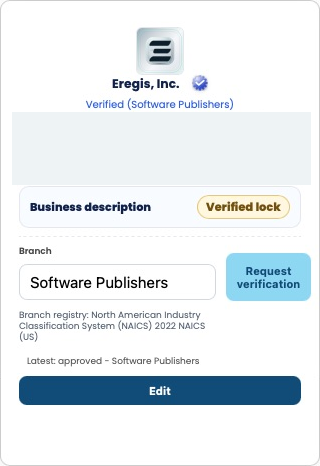
Example of an approved US company identity. Business contact and tax details are redacted; the request controls remain visible. -
Open QuickBooks in DynamicBooks
Open DynamicBooks, choose Integrations, then QuickBooks. Keep this page open while Intuit opens in another tab. Confirm that the company name at the top is the one you intend to connect.
Expected outcome: The QuickBooks connection page belongs to your selected DynamicBooks company.
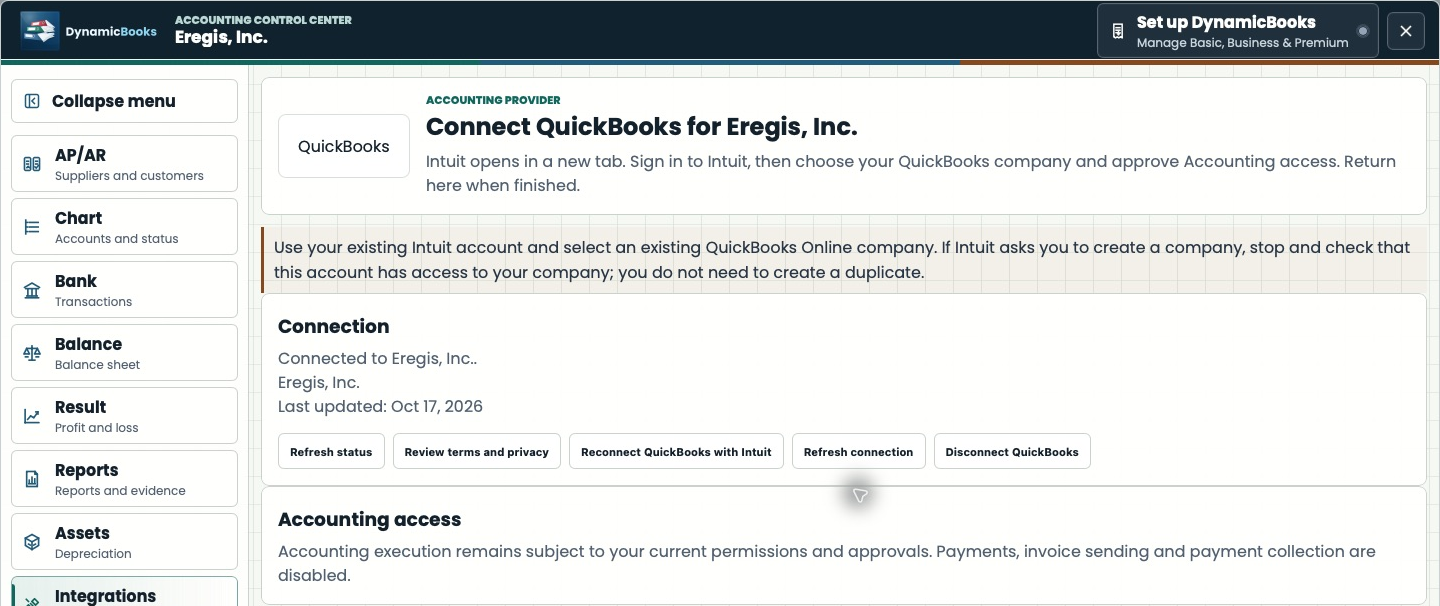
Live platform capture, refreshed October 17, 2026. Connected-state example, not an initial unconnected screen. The company and current accounting restrictions are shown. -
Review terms and privacy
Open the QuickBooks terms and privacy review. Read the documents and download a copy if needed. An authorized person can select Accept & Close when ready. Agents cannot accept legal terms for you.
Expected outcome: The authorized person has reviewed the connection documents.
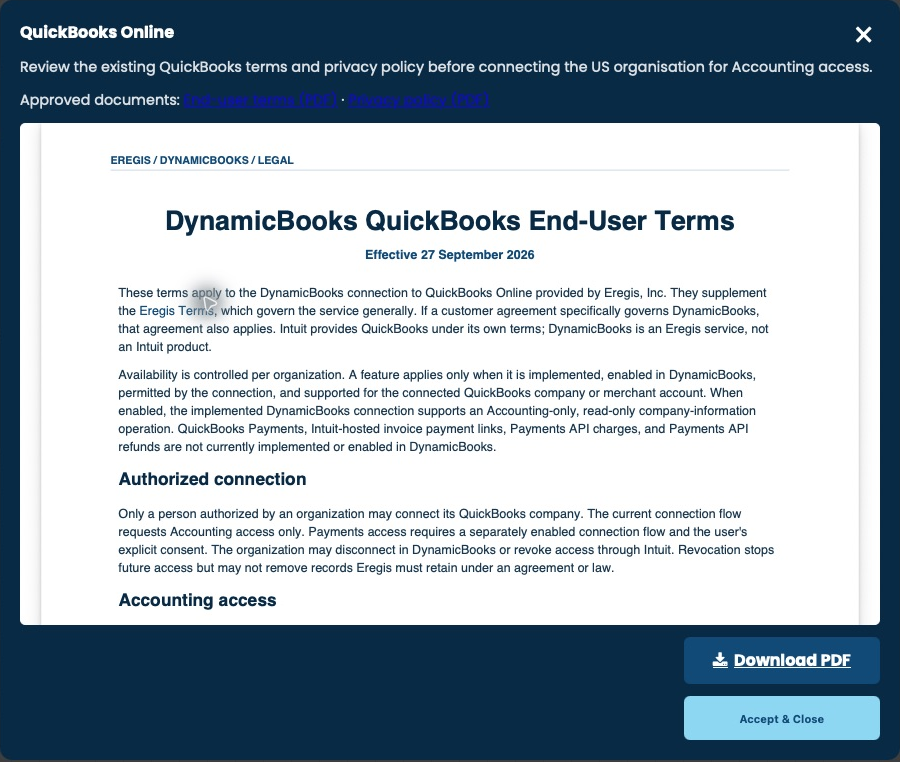
Review the documents before you accept. This capture shows the review screen; it does not record a new acceptance. -
Choose your existing QuickBooks company
Continue to Intuit and sign in as the primary admin or a company admin. Select the QuickBooks Online company you already use. Review Eregis DynamicBooks Connector and the Accounting access request, then choose Connect when you agree.
Expected outcome: Intuit returns you to the DynamicBooks connection flow.
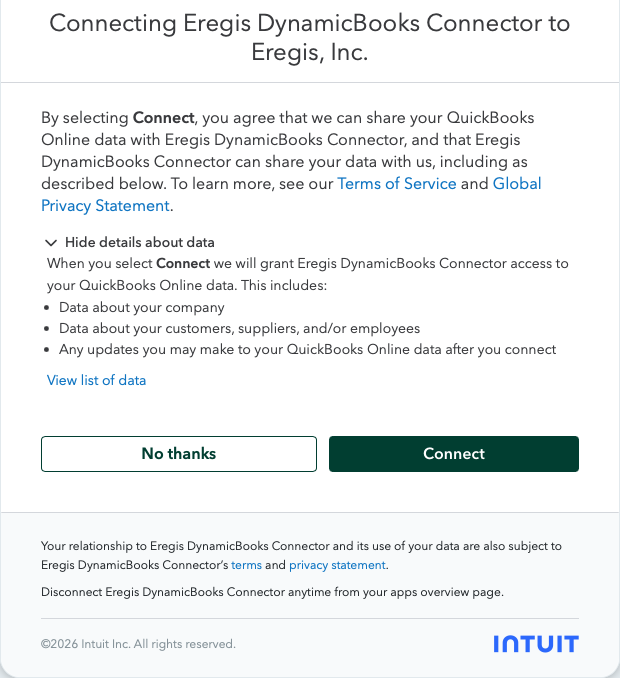
User-supplied Intuit consent screen. Choose the correct company before selecting Connect. The signed-in personal name is cropped out. -
Return and confirm the connection
Return to DynamicBooks and use Refresh status if the page has not updated. Check that Connected appears with the intended company. An Intuit confirmation email is helpful evidence, but the platform status is the place to confirm your connection.
Expected outcome: Connected is shown for the expected company. Your agents can use the operations permitted by your current catalog and approvals.
Live platform capture, refreshed October 17, 2026. Connected-state example, not an initial unconnected screen. The company and current accounting restrictions are shown. 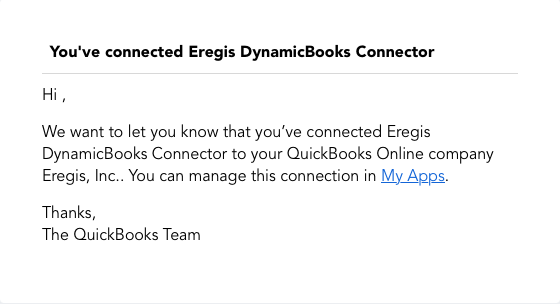
User-supplied Intuit notification, cropped to remove recipient details. This illustrates a provider confirmation; check the platform connection status too.
Permissions and approvals
Accounting consent
Intuit consent grants the requested Accounting scope. It does not itself enable every accounting feature or grant Payments access.
Your current operation access
Two shared workflow tool contracts and five QuickBooks actions are documented in reviewed integration source. The provider catalog describes 259 operations across 80 families; these are metadata coverage, not 259 enabled tools. Live available operations are returned by your tenant catalog. The current connection supports a bounded read of company information; payments, invoice sending and payment collection are disabled.
Agent tools and functionality (2)
Company information
The current connection provides a bounded read of the connected company’s profile.
Accounting catalog coverage
The reviewed provider catalog covers accounts, customers, suppliers, transactions, reports, tax, inventory and supporting records. Availability is evaluated per operation; a catalog entry is not proof of enabled execution.
Protected requests
Classified operations require the specific human approval requested by the workflow. Review the exact request before approval.
Five QuickBooks workflow actions
quickbooks.operations.list: List the QuickBooks operations available to the current connection and caller. quickbooks.operations.describe: Read the operation’s contract, input requirements and approval conditions. quickbooks.operations.execute: Request an operation under its read, preview or confirmed-execution policy. This does not make disabled provider operations available. quickbooks.operations.status: Read the status of a previously submitted operation. quickbooks.operations.reconcile: Reconcile an existing request before deciding whether a new attempt is safe.
Provider catalog coverage: 80 families and 259 operations
Two shared workflow tool contracts and five QuickBooks actions are documented in reviewed integration source. The provider catalog describes 259 operations across 80 families; these are metadata coverage, not 259 enabled tools. Live available operations are returned by your tenant catalog. The current connection supports a bounded read of company information; payments, invoice sending and payment collection are disabled.
Account · 4 catalog operations
Catalog coverage for account. Use only operations returned by the effective tenant catalog; provider features and permissions vary.
Account List Detail · 1 catalog operations
Catalog coverage for account list detail. Use only operations returned by the effective tenant catalog; provider features and permissions vary.
Ap Aging Detail · 1 catalog operations
Catalog coverage for ap aging detail. Use only operations returned by the effective tenant catalog; provider features and permissions vary.
Ap Aging Summary · 1 catalog operations
Catalog coverage for ap aging summary. Use only operations returned by the effective tenant catalog; provider features and permissions vary.
Ar Aging Detail · 1 catalog operations
Catalog coverage for ar aging detail. Use only operations returned by the effective tenant catalog; provider features and permissions vary.
Ar Aging Summary · 1 catalog operations
Catalog coverage for ar aging summary. Use only operations returned by the effective tenant catalog; provider features and permissions vary.
Attachable · 7 catalog operations
Catalog coverage for attachable. Use only operations returned by the effective tenant catalog; provider features and permissions vary.
Balance Sheet · 1 catalog operations
Catalog coverage for balance sheet. Use only operations returned by the effective tenant catalog; provider features and permissions vary.
Batch · 1 catalog operations
Catalog coverage for batch. Use only operations returned by the effective tenant catalog; provider features and permissions vary.
Bill · 5 catalog operations
Catalog coverage for bill. Use only operations returned by the effective tenant catalog; provider features and permissions vary.
Bill Payment · 6 catalog operations
Catalog coverage for bill payment. Use only operations returned by the effective tenant catalog; provider features and permissions vary.
Budget · 5 catalog operations
Catalog coverage for budget. Use only operations returned by the effective tenant catalog; provider features and permissions vary.
Cash Flow · 1 catalog operations
Catalog coverage for cash flow. Use only operations returned by the effective tenant catalog; provider features and permissions vary.
Change Data Capture · 1 catalog operations
Catalog coverage for change data capture. Use only operations returned by the effective tenant catalog; provider features and permissions vary.
Change Order · 4 catalog operations
Catalog coverage for change order. Use only operations returned by the effective tenant catalog; provider features and permissions vary.
Class · 4 catalog operations
Catalog coverage for class. Use only operations returned by the effective tenant catalog; provider features and permissions vary.
Company Currency · 4 catalog operations
Catalog coverage for company currency. Use only operations returned by the effective tenant catalog; provider features and permissions vary.
Company Info · 4 catalog operations
Catalog coverage for company info. Use only operations returned by the effective tenant catalog; provider features and permissions vary.
Credit Card Payment · 6 catalog operations
Catalog coverage for credit card payment. Use only operations returned by the effective tenant catalog; provider features and permissions vary.
Credit Memo · 7 catalog operations
Catalog coverage for credit memo. Use only operations returned by the effective tenant catalog; provider features and permissions vary.
Customer · 5 catalog operations
Catalog coverage for customer. Use only operations returned by the effective tenant catalog; provider features and permissions vary.
Customer Balance · 1 catalog operations
Catalog coverage for customer balance. Use only operations returned by the effective tenant catalog; provider features and permissions vary.
Customer Balance Detail · 1 catalog operations
Catalog coverage for customer balance detail. Use only operations returned by the effective tenant catalog; provider features and permissions vary.
Customer Income · 1 catalog operations
Catalog coverage for customer income. Use only operations returned by the effective tenant catalog; provider features and permissions vary.
Customer Type · 2 catalog operations
Catalog coverage for customer type. Use only operations returned by the effective tenant catalog; provider features and permissions vary.
Department · 4 catalog operations
Catalog coverage for department. Use only operations returned by the effective tenant catalog; provider features and permissions vary.
Deposit · 6 catalog operations
Catalog coverage for deposit. Use only operations returned by the effective tenant catalog; provider features and permissions vary.
Employee · 4 catalog operations
Catalog coverage for employee. Use only operations returned by the effective tenant catalog; provider features and permissions vary.
Entitlements · 1 catalog operations
Catalog coverage for entitlements. Use only operations returned by the effective tenant catalog; provider features and permissions vary.
Estimate · 8 catalog operations
Catalog coverage for estimate. Use only operations returned by the effective tenant catalog; provider features and permissions vary.
Exchangerate · 3 catalog operations
Catalog coverage for exchangerate. Use only operations returned by the effective tenant catalog; provider features and permissions vary.
General Ledger · 1 catalog operations
Catalog coverage for general ledger. Use only operations returned by the effective tenant catalog; provider features and permissions vary.
Inventory Adjustment · 4 catalog operations
Catalog coverage for inventory adjustment. Use only operations returned by the effective tenant catalog; provider features and permissions vary.
Inventory Valuation Detail · 1 catalog operations
Catalog coverage for inventory valuation detail. Use only operations returned by the effective tenant catalog; provider features and permissions vary.
Inventory Valuation Summary · 1 catalog operations
Catalog coverage for inventory valuation summary. Use only operations returned by the effective tenant catalog; provider features and permissions vary.
Invoice · 9 catalog operations
Catalog coverage for invoice. Use only operations returned by the effective tenant catalog; provider features and permissions vary.
Item · 10 catalog operations
Catalog coverage for item. Use only operations returned by the effective tenant catalog; provider features and permissions vary.
Journal Entry · 6 catalog operations
Catalog coverage for journal entry. Use only operations returned by the effective tenant catalog; provider features and permissions vary.
Journal Report · 1 catalog operations
Catalog coverage for journal report. Use only operations returned by the effective tenant catalog; provider features and permissions vary.
Payment · 8 catalog operations
Catalog coverage for payment. Use only operations returned by the effective tenant catalog; provider features and permissions vary.
Payment Method · 4 catalog operations
Catalog coverage for payment method. Use only operations returned by the effective tenant catalog; provider features and permissions vary.
Preferences · 3 catalog operations
Catalog coverage for preferences. Use only operations returned by the effective tenant catalog; provider features and permissions vary.
Profit And Loss · 1 catalog operations
Catalog coverage for profit and loss. Use only operations returned by the effective tenant catalog; provider features and permissions vary.
Profit And Loss Detail · 1 catalog operations
Catalog coverage for profit and loss detail. Use only operations returned by the effective tenant catalog; provider features and permissions vary.
Purchase · 5 catalog operations
Catalog coverage for purchase. Use only operations returned by the effective tenant catalog; provider features and permissions vary.
Purchase Order · 7 catalog operations
Catalog coverage for purchase order. Use only operations returned by the effective tenant catalog; provider features and permissions vary.
Recurring Transaction · 4 catalog operations
Catalog coverage for recurring transaction. Use only operations returned by the effective tenant catalog; provider features and permissions vary.
Refund Receipt · 8 catalog operations
Catalog coverage for refund receipt. Use only operations returned by the effective tenant catalog; provider features and permissions vary.
Reimburse Charge · 2 catalog operations
Catalog coverage for reimburse charge. Use only operations returned by the effective tenant catalog; provider features and permissions vary.
Sales By Class Summary · 1 catalog operations
Catalog coverage for sales by class summary. Use only operations returned by the effective tenant catalog; provider features and permissions vary.
Sales By Customer · 1 catalog operations
Catalog coverage for sales by customer. Use only operations returned by the effective tenant catalog; provider features and permissions vary.
Sales By Department · 1 catalog operations
Catalog coverage for sales by department. Use only operations returned by the effective tenant catalog; provider features and permissions vary.
Sales By Product · 1 catalog operations
Catalog coverage for sales by product. Use only operations returned by the effective tenant catalog; provider features and permissions vary.
Sales Receipt · 9 catalog operations
Catalog coverage for sales receipt. Use only operations returned by the effective tenant catalog; provider features and permissions vary.
Tax Agency · 3 catalog operations
Catalog coverage for tax agency. Use only operations returned by the effective tenant catalog; provider features and permissions vary.
Tax Classification · 4 catalog operations
Catalog coverage for tax classification. Use only operations returned by the effective tenant catalog; provider features and permissions vary.
Tax Code · 2 catalog operations
Catalog coverage for tax code. Use only operations returned by the effective tenant catalog; provider features and permissions vary.
Tax Payment · 2 catalog operations
Catalog coverage for tax payment. Use only operations returned by the effective tenant catalog; provider features and permissions vary.
Tax Rate · 2 catalog operations
Catalog coverage for tax rate. Use only operations returned by the effective tenant catalog; provider features and permissions vary.
Tax Service · 1 catalog operations
Catalog coverage for tax service. Use only operations returned by the effective tenant catalog; provider features and permissions vary.
Tax Summary · 1 catalog operations
Catalog coverage for tax summary. Use only operations returned by the effective tenant catalog; provider features and permissions vary.
Term · 4 catalog operations
Catalog coverage for term. Use only operations returned by the effective tenant catalog; provider features and permissions vary.
Time Activity · 5 catalog operations
Catalog coverage for time activity. Use only operations returned by the effective tenant catalog; provider features and permissions vary.
Transaction List · 1 catalog operations
Catalog coverage for transaction list. Use only operations returned by the effective tenant catalog; provider features and permissions vary.
Transaction List By Customer · 1 catalog operations
Catalog coverage for transaction list by customer. Use only operations returned by the effective tenant catalog; provider features and permissions vary.
Transaction List By Vendor · 1 catalog operations
Catalog coverage for transaction list by vendor. Use only operations returned by the effective tenant catalog; provider features and permissions vary.
Transaction List With Splits · 1 catalog operations
Catalog coverage for transaction list with splits. Use only operations returned by the effective tenant catalog; provider features and permissions vary.
Transfer · 6 catalog operations
Catalog coverage for transfer. Use only operations returned by the effective tenant catalog; provider features and permissions vary.
Trial Balance · 1 catalog operations
Catalog coverage for trial balance. Use only operations returned by the effective tenant catalog; provider features and permissions vary.
Vendor · 4 catalog operations
Catalog coverage for vendor. Use only operations returned by the effective tenant catalog; provider features and permissions vary.
Vendor Balance · 1 catalog operations
Catalog coverage for vendor balance. Use only operations returned by the effective tenant catalog; provider features and permissions vary.
Vendor Balance Detail · 1 catalog operations
Catalog coverage for vendor balance detail. Use only operations returned by the effective tenant catalog; provider features and permissions vary.
Vendor Credit · 5 catalog operations
Catalog coverage for vendor credit. Use only operations returned by the effective tenant catalog; provider features and permissions vary.
Vendor Expenses · 1 catalog operations
Catalog coverage for vendor expenses. Use only operations returned by the effective tenant catalog; provider features and permissions vary.
Bank Accounts · 5 catalog operations
Catalog coverage for bank accounts. Payment functionality is excluded from the current connection.
Cards · 5 catalog operations
Catalog coverage for cards. Payment functionality is excluded from the current connection.
Charges · 6 catalog operations
Catalog coverage for charges. Payment functionality is excluded from the current connection.
E Checks · 4 catalog operations
Catalog coverage for e checks. Payment functionality is excluded from the current connection.
Payment Receipt · 1 catalog operations
Catalog coverage for payment receipt. Payment functionality is excluded from the current connection.
Tokens · 1 catalog operations
Catalog coverage for tokens. Payment functionality is excluded from the current connection.
- Accounting workflow
accounting.workflow - Discovers and describes available accounting operations, requests permitted execution, checks status and reconciles an existing request. The server binds the company and enforces permissions, previews, approvals and idempotency.
- Human approval workflow
human_presence.workflow - Requests and checks human presence for classified protected accounting operations. Approval is for the specific request; this tool does not perform accounting work or approve legal terms.
Manage your connection
Refresh status
Read the current connection state without changing the selected company.
Review terms and privacy
Reopen the connection documents from the QuickBooks page.
Reconnect QuickBooks with Intuit
Complete a new provider authorization when reconnection is required. Confirm the company again.
Refresh connection
Use the platform’s connection refresh control when directed by the connection state.
Disconnect QuickBooks
Disconnect from DynamicBooks when you no longer want this connection. You can also manage connected apps in Intuit.
Manage Intuit connectionsTroubleshooting
Company verification required
Open New letter and review the company identity card. If the verified badge is missing, use Request verification and complete the manual US review before retrying. See the US verification guide.
Intuit offers a new company
Existing customers should check the signed-in Intuit account and company-admin access first. Genuine new customers may complete provider signup and subscription setup, then return.
The wrong company is listed
Stop before requesting agent work. Reconnect with the correct Intuit company; check both platform and provider company names.
You return without Connected
Return to Integrations, refresh status and check the company. Retry the connection flow only after checking its current state; complete any Intuit sign-in challenge yourself.
An agent action is unavailable
Ask the agent to discover the effective operation catalog. Connection status does not override permissions, subscription limits, disabled features or operation-specific approval requirements.